Setting Up IAM Roles for Use with the AWS EC2 FPGA Development Kit#
This guide covers the IAM permissions required for various operations in the AWS EC2 FPGA Development Kit.
Table of Contents#
How to Create an IAM Role#
In a browser, navigate to the AWS EC2 Console
In the search bar, search for
IAMand click on it in the search results
Search Results#
On the IAM console, click
Roleson the left side of the console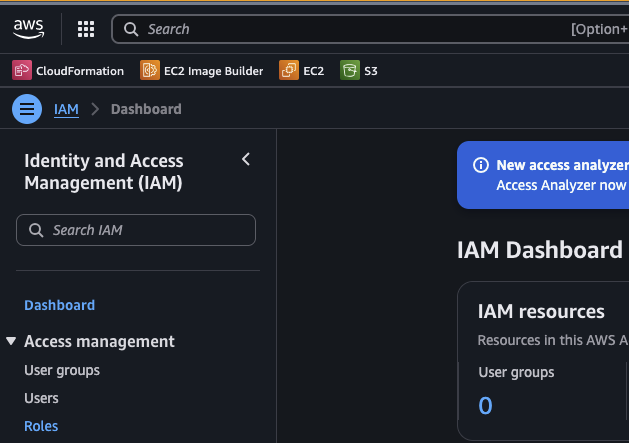
Roles#
On the Roles screen, click
Create rolein the top right corner of the console
Create Role#
Under
Select trusted entity, selectAWS serviceas theTrusted entity typeUnder
Use caseselectEC2On the choice selection that appears, use
EC2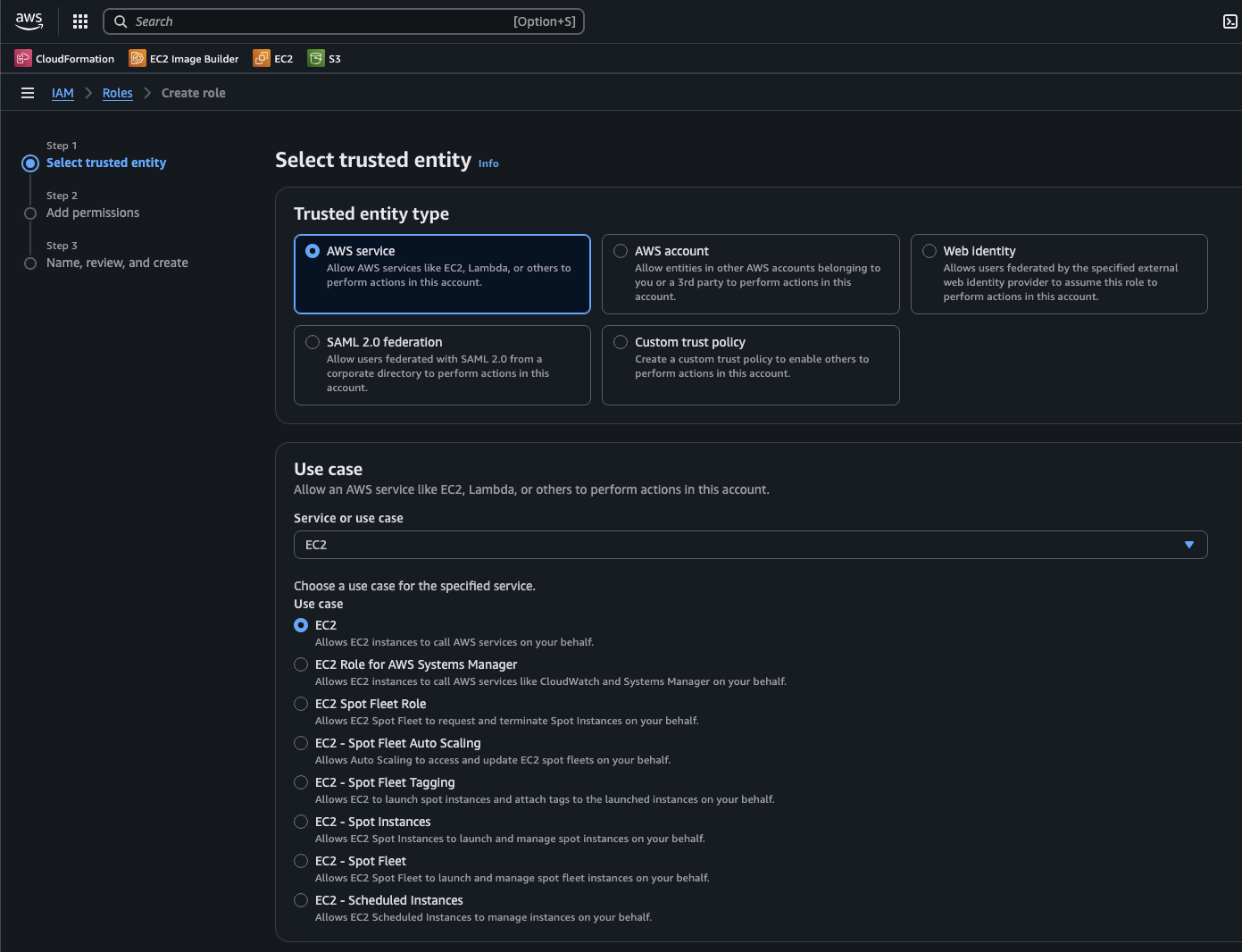
Select Trusted Entity#
Under
Name, review, create, provide a name and description that associates the role with building runtime AMIsIn the
Step 1: Select trusted entitiesform, no edits are necessary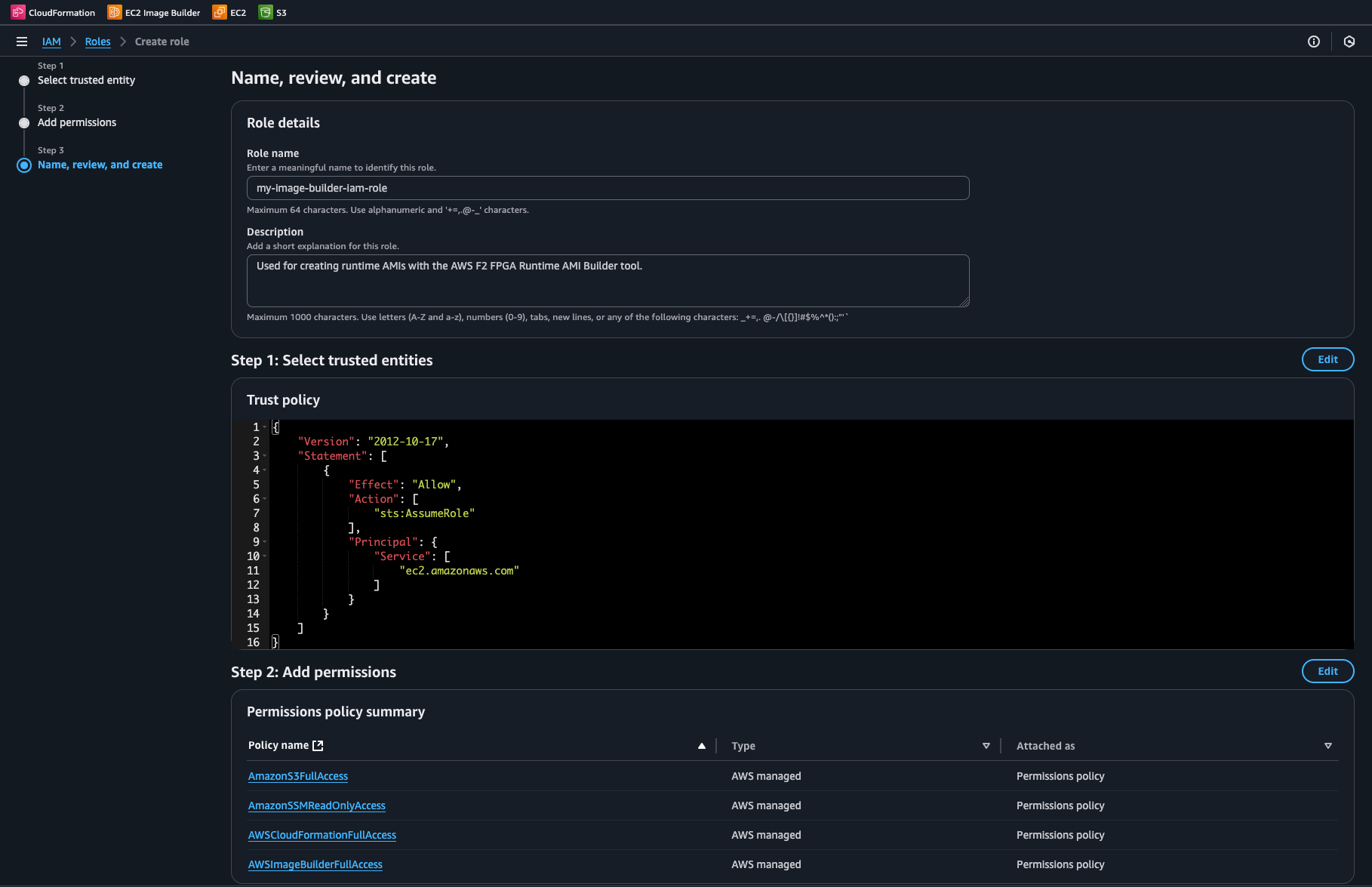
Name Review Create#
Click
Create roleSearch for the newly created role in the IAM console and open its details page
Click the
Add permissionsdropdown and selectCreate inline policy
Inline Policy#
Paste into the JSON editor either the AFI Creation Policy or the Runtime AMI Builder Policy
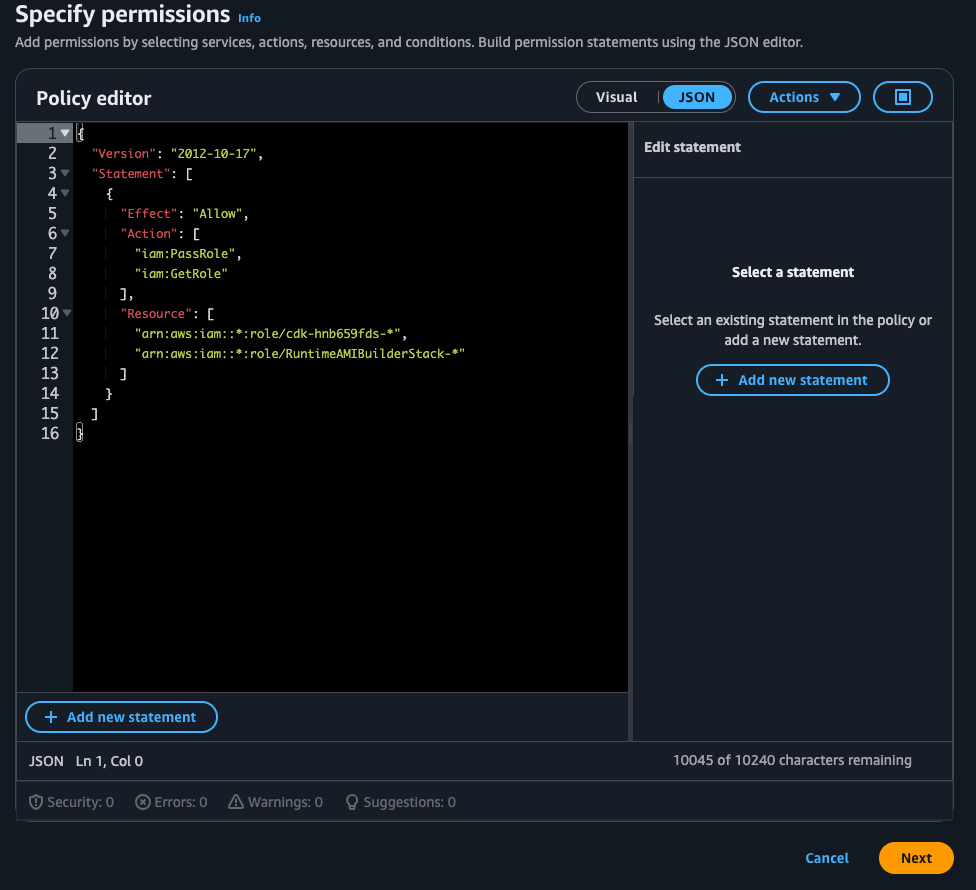
Role Pass#
After replacing
CUSTOMER-BUCKET-NAMEorCUSTOMER-AWS-ACCOUNT-NUMBERwhere needed, clickNextand confirm the changes
AFI Creation Permissions#
The create_afi.py script and the
underlying aws ec2 create-fpga-image API require specific IAM
permissions to create Amazon FPGA Images (AFIs).
Required Permissions#
Permission |
Purpose |
|---|---|
|
List available S3 buckets for interactive selection |
|
Verify bucket is in the correct region |
|
List objects in the bucket |
|
Upload DCP tarball to S3 |
|
AFI creation requires that the object be readable in its bucket |
|
Create the AFI |
|
Check AFI generation status |
Optional Permissions#
Permission |
Feature |
Notes |
|---|---|---|
|
Dynamic F2 region discovery |
Used to list regions that support AFI ingestion. If no AWS credentials are configured, the script falls back to a hardcoded region list. |
|
Delete AFI |
Allows deletion of AFIs |
|
Modify AFI attributes |
Allows modification of AFI attributes such as name, description, and sharing permissions |
|
Describe AFI attributes |
Allows querying specific AFI attributes |
|
Copy AFI |
Allows copying AFIs across regions |
|
Reset AFI attributes |
Allows resetting AFI attributes to default values |
|
Create new S3 bucket |
Only needed with –create-bucket flag or when creating a new bucket to hold the AFI creation resources |
sns:CreateTopic, sns:Subscribe, sns:Publish |
Email notifications |
Only needed with –email flag or when requesting an email notification when AFI is available |
Complete IAM Policy for AFI Creation#
The following policy covers all features of create_afi.py. This is a
customer-managed policy that can be named as needed. Replace
CUSTOMER-BUCKET-NAME with the actual S3 bucket name. The
SNSNotifications statement is scoped to the CREATE_AFI topic
name (the script’s default). This can be adjusted if using
--sns-topic with a different name.
{
  "Version": "2012-10-17",
  "Statement": [
    {
      "Sid": "S3BucketDiscovery",
      "Effect": "Allow",
      "Action": [
        "s3:ListAllMyBuckets",
        "s3:GetBucketLocation"
      ],
      "Resource": "*"
    },
    {
      "Sid": "S3BucketOperations",
      "Effect": "Allow",
      "Action": [
        "s3:ListBucket",
        "s3:PutObject",
        "s3:GetObject",
        "s3:CreateBucket"
      ],
      "Resource": [
        "arn:aws:s3:::CUSTOMER-BUCKET-NAME",
        "arn:aws:s3:::CUSTOMER-BUCKET-NAME/*"
      ]
    },
    {
      "Sid": "EC2FpgaOperations",
      "Effect": "Allow",
      "Action": [
        "ec2:CreateFpgaImage",
        "ec2:DescribeFpgaImages"
      ],
      "Resource": "*"
    },
    {
      "Sid": "EC2RegionDiscovery",
      "Effect": "Allow",
      "Action": "ec2:DescribeInstanceTypeOfferings",
      "Resource": "*"
    },
    {
      "Sid": "SNSNotifications",
      "Effect": "Allow",
      "Action": [
        "sns:CreateTopic",
        "sns:Subscribe",
        "sns:Publish"
      ],
      "Resource": "arn:aws:sns:*:*:CREATE_AFI"
    }
  ]
}
Runtime AMI Builder Permissions#
The Runtime AMI Builder uses the AWS CDK to deploy EC2 Image Builder resources. This requires an IAM role attached to the EC2 instance running the CDK deployment.
Required Permissions Overview#
The IAM role needs permissions for:
Service |
Purpose |
|---|---|
CloudFormation |
Deploy and manage the CDK stack |
EC2 Image Builder |
Create pipelines, recipes, components, and infrastructure configurations |
S3 |
Access the CDK bootstrap bucket for deployment assets |
SSM |
Read CDK bootstrap parameters |
IAM |
Create and pass roles for Image Builder build instances |
Complete IAM Policy for Runtime AMI Builder Use#
CUSTOMER-AWS-ACCOUNT-NUMBER should be substituted with an actual AWS
account number for each occurrence below.
{
  "Version": "2012-10-17",
  "Statement": [
    {
      "Sid": "CDKBootstrapCloudFormation",
      "Effect": "Allow",
      "Action": [
        "cloudformation:CreateStack",
        "cloudformation:UpdateStack",
        "cloudformation:DeleteStack",
        "cloudformation:DescribeStacks",
        "cloudformation:DescribeStackResources",
        "cloudformation:CreateChangeSet",
        "cloudformation:DescribeChangeSet",
        "cloudformation:ExecuteChangeSet",
        "cloudformation:DeleteChangeSet",
        "cloudformation:GetTemplate"
      ],
      "Resource": "arn:aws:cloudformation:*:CUSTOMER-AWS-ACCOUNT-NUMBER:stack/CDKToolkit/*"
    },
    {
      "Sid": "CDKAppCloudFormation",
      "Effect": "Allow",
      "Action": [
        "cloudformation:CreateStack",
        "cloudformation:UpdateStack",
        "cloudformation:DeleteStack",
        "cloudformation:DescribeStacks",
        "cloudformation:DescribeStackResources",
        "cloudformation:CreateChangeSet",
        "cloudformation:DescribeChangeSet",
        "cloudformation:ExecuteChangeSet",
        "cloudformation:DeleteChangeSet",
        "cloudformation:GetTemplate",
        "cloudformation:GetTemplateSummary"
      ],
      "Resource": "arn:aws:cloudformation:*:CUSTOMER-AWS-ACCOUNT-NUMBER:stack/*Stack/*"
    },
    {
      "Sid": "CDKCloudFormationGlobal",
      "Effect": "Allow",
      "Action": "cloudformation:DescribeStackEvents",
      "Resource": "*"
    },
    {
      "Sid": "CDKBootstrapS3",
      "Effect": "Allow",
      "Action": [
        "s3:CreateBucket",
        "s3:DeleteBucket",
        "s3:PutBucketPolicy",
        "s3:DeleteBucketPolicy",
        "s3:PutBucketVersioning",
        "s3:PutBucketPublicAccessBlock",
        "s3:PutEncryptionConfiguration",
        "s3:PutLifecycleConfiguration",
        "s3:GetBucketLocation",
        "s3:GetEncryptionConfiguration",
        "s3:GetBucketVersioning",
        "s3:GetBucketPolicy",
        "s3:GetLifecycleConfiguration",
        "s3:ListBucket",
        "s3:PutObject",
        "s3:GetObject",
        "s3:DeleteObject"
      ],
      "Resource": [
        "arn:aws:s3:::cdk-hnb659fds-assets-CUSTOMER-AWS-ACCOUNT-NUMBER-*",
        "arn:aws:s3:::cdk-hnb659fds-assets-CUSTOMER-AWS-ACCOUNT-NUMBER-*/*"
      ]
    },
    {
      "Sid": "CDKBootstrapIAMRoles",
      "Effect": "Allow",
      "Action": [
        "iam:CreateRole",
        "iam:DeleteRole",
        "iam:AttachRolePolicy",
        "iam:DetachRolePolicy",
        "iam:PutRolePolicy",
        "iam:DeleteRolePolicy",
        "iam:GetRole",
        "iam:GetRolePolicy",
        "iam:TagRole",
        "iam:PassRole"
      ],
      "Resource": [
        "arn:aws:iam::CUSTOMER-AWS-ACCOUNT-NUMBER:role/cdk-hnb659fds-cfn-exec-role-CUSTOMER-AWS-ACCOUNT-NUMBER-*",
        "arn:aws:iam::CUSTOMER-AWS-ACCOUNT-NUMBER:role/cdk-hnb659fds-deploy-role-CUSTOMER-AWS-ACCOUNT-NUMBER-*",
        "arn:aws:iam::CUSTOMER-AWS-ACCOUNT-NUMBER:role/cdk-hnb659fds-file-publishing-role-CUSTOMER-AWS-ACCOUNT-NUMBER-*",
        "arn:aws:iam::CUSTOMER-AWS-ACCOUNT-NUMBER:role/cdk-hnb659fds-image-publishing-role-CUSTOMER-AWS-ACCOUNT-NUMBER-*",
        "arn:aws:iam::CUSTOMER-AWS-ACCOUNT-NUMBER:role/cdk-hnb659fds-lookup-role-CUSTOMER-AWS-ACCOUNT-NUMBER-*"
      ]
    },
    {
      "Sid": "CDKBootstrapSSM",
      "Effect": "Allow",
      "Action": [
        "ssm:PutParameter",
        "ssm:GetParameter",
        "ssm:DeleteParameter"
      ],
      "Resource": "arn:aws:ssm:*:CUSTOMER-AWS-ACCOUNT-NUMBER:parameter/cdk-bootstrap/hnb659fds/*"
    },
    {
      "Sid": "CDKBootstrapECR",
      "Effect": "Allow",
      "Action": [
        "ecr:CreateRepository",
        "ecr:DeleteRepository",
        "ecr:DescribeRepositories",
        "ecr:SetRepositoryPolicy",
        "ecr:GetRepositoryPolicy",
        "ecr:DeleteRepositoryPolicy",
        "ecr:PutLifecyclePolicy",
        "ecr:GetLifecyclePolicy",
        "ecr:DeleteLifecyclePolicy",
        "ecr:TagResource"
      ],
      "Resource": "arn:aws:ecr:*:CUSTOMER-AWS-ACCOUNT-NUMBER:repository/cdk-hnb659fds-container-assets-CUSTOMER-AWS-ACCOUNT-NUMBER-*"
    },
    {
      "Sid": "CDKAssumeDeployRoles",
      "Effect": "Allow",
      "Action": "sts:AssumeRole",
      "Resource": [
        "arn:aws:iam::CUSTOMER-AWS-ACCOUNT-NUMBER:role/cdk-hnb659fds-deploy-role-CUSTOMER-AWS-ACCOUNT-NUMBER-*",
        "arn:aws:iam::CUSTOMER-AWS-ACCOUNT-NUMBER:role/cdk-hnb659fds-file-publishing-role-CUSTOMER-AWS-ACCOUNT-NUMBER-*",
        "arn:aws:iam::CUSTOMER-AWS-ACCOUNT-NUMBER:role/cdk-hnb659fds-lookup-role-CUSTOMER-AWS-ACCOUNT-NUMBER-*",
        "arn:aws:iam::CUSTOMER-AWS-ACCOUNT-NUMBER:role/cdk-hnb659fds-image-publishing-role-CUSTOMER-AWS-ACCOUNT-NUMBER-*"
      ]
    },
    {
      "Sid": "ImageBuilderResources",
      "Effect": "Allow",
      "Action": [
        "imagebuilder:CreateComponent",
        "imagebuilder:DeleteComponent",
        "imagebuilder:GetComponent",
        "imagebuilder:TagResource",
        "imagebuilder:CreateImageRecipe",
        "imagebuilder:DeleteImageRecipe",
        "imagebuilder:GetImageRecipe",
        "imagebuilder:CreateInfrastructureConfiguration",
        "imagebuilder:DeleteInfrastructureConfiguration",
        "imagebuilder:GetInfrastructureConfiguration",
        "imagebuilder:UpdateInfrastructureConfiguration",
        "imagebuilder:CreateDistributionConfiguration",
        "imagebuilder:DeleteDistributionConfiguration",
        "imagebuilder:GetDistributionConfiguration",
        "imagebuilder:UpdateDistributionConfiguration",
        "imagebuilder:CreateImagePipeline",
        "imagebuilder:DeleteImagePipeline",
        "imagebuilder:GetImagePipeline",
        "imagebuilder:UpdateImagePipeline"
      ],
      "Resource": [
        "arn:aws:imagebuilder:*:CUSTOMER-AWS-ACCOUNT-NUMBER:component/*",
        "arn:aws:imagebuilder:*:CUSTOMER-AWS-ACCOUNT-NUMBER:image-recipe/*",
        "arn:aws:imagebuilder:*:CUSTOMER-AWS-ACCOUNT-NUMBER:infrastructure-configuration/*",
        "arn:aws:imagebuilder:*:CUSTOMER-AWS-ACCOUNT-NUMBER:distribution-configuration/*",
        "arn:aws:imagebuilder:*:CUSTOMER-AWS-ACCOUNT-NUMBER:image-pipeline/*"
      ]
    },
    {
      "Sid": "ImageBuilderIAMRole",
      "Effect": "Allow",
      "Action": [
        "iam:CreateRole",
        "iam:DeleteRole",
        "iam:GetRole",
        "iam:TagRole",
        "iam:AttachRolePolicy",
        "iam:DetachRolePolicy",
        "iam:PutRolePolicy",
        "iam:DeleteRolePolicy"
      ],
      "Resource": "arn:aws:iam::CUSTOMER-AWS-ACCOUNT-NUMBER:role/*ImageBuilderRole"
    },
    {
      "Sid": "ImageBuilderInstanceProfile",
      "Effect": "Allow",
      "Action": [
        "iam:CreateInstanceProfile",
        "iam:DeleteInstanceProfile",
        "iam:GetInstanceProfile",
        "iam:AddRoleToInstanceProfile",
        "iam:RemoveRoleFromInstanceProfile"
      ],
      "Resource": "arn:aws:iam::CUSTOMER-AWS-ACCOUNT-NUMBER:instance-profile/*InstanceProfile"
    },
    {
      "Sid": "ImageBuilderPassRole",
      "Effect": "Allow",
      "Action": "iam:PassRole",
      "Resource": "arn:aws:iam::CUSTOMER-AWS-ACCOUNT-NUMBER:role/*ImageBuilderRole",
      "Condition": {
        "StringEquals": {
          "iam:PassedToService": "ec2.amazonaws.com"
        }
      }
    },
    {
      "Sid": "ImageBuilderManagedPolicies",
      "Effect": "Allow",
      "Action": [
        "iam:GetPolicy",
        "iam:GetPolicyVersion"
      ],
      "Resource": [
        "arn:aws:iam::aws:policy/AmazonSSMManagedInstanceCore",
        "arn:aws:iam::aws:policy/EC2InstanceProfileForImageBuilder"
      ]
    },
    {
      "Sid": "ImageBuilderS3Access",
      "Effect": "Allow",
      "Action": [
        "s3:GetObject",
        "s3:PutObject",
        "s3:ListBucket",
        "s3:GetBucketLocation"
      ],
      "Resource": [
        "arn:aws:s3:::ec2imagebuilder-*",
        "arn:aws:s3:::ec2imagebuilder-*/*"
      ]
    }
  ]
}
Attaching an IAM Role to an EC2 Instance#
When creating an AFI or running the RAB on an AWS EC2 Instance, the created IAM role must be attached under the “Advanced details” section in the Launch Instances interface.
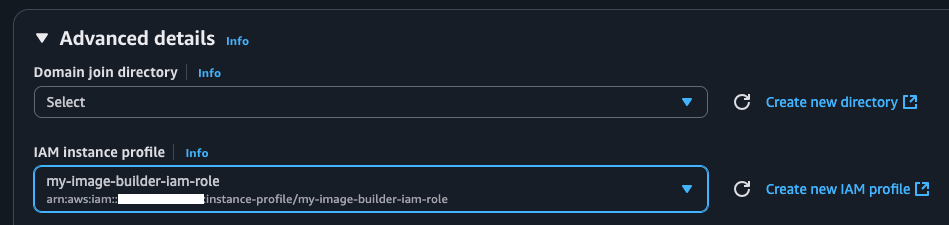
IAM Attach#
If the instance is already launched, the IAM role can be attached retroactively. On the EC2 Instances screen, select “Modify IAM role” under Actions -> Security.

IAM Post Attach#
At this point AFI creation and the RAB are ready to run after remoting into the instance.